Robots · Humanoids
Pollen Robotics Reachy 2 teleoperation: the VR app, the LeRobot recording path and the settings that decide data quality
Reachy 2 is the humanoid with the shortest path from a VR session to a LeRobot dataset on the Hugging Face Hub. The path is short, but it has a few settings that quietly decide whether the data trains.
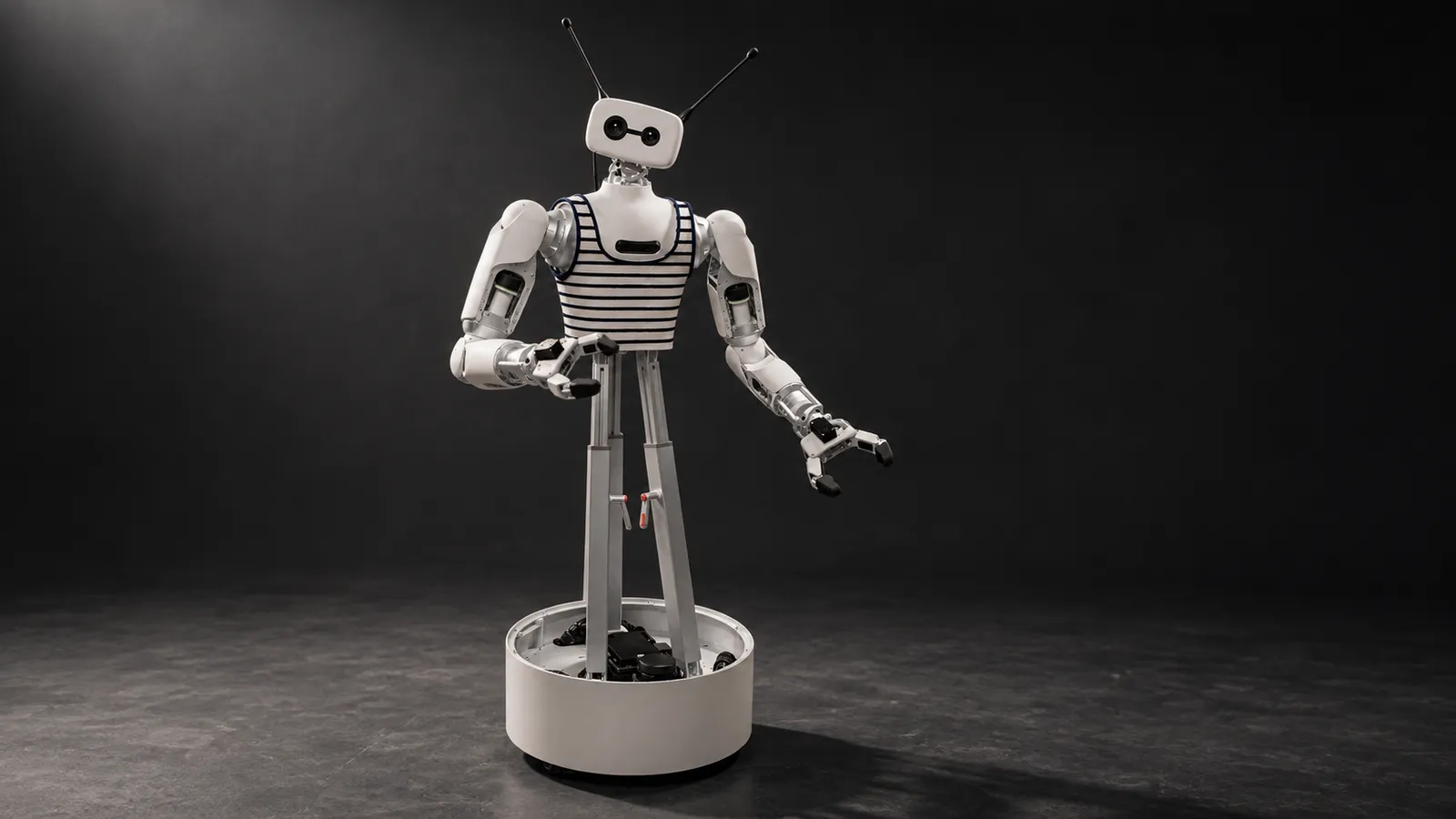
- Height
- 136 to 166 cm, adjusted manually
- Weight
- Up to 50 kg for the full robot
- Arms
- Two 7-DoF arms from parallel actuators (2 x 2-DoF and 1 x 3-DoF each), about 3 kg payload per arm
- Head
- 3-DoF neck (Orbita parallel actuators), stereo and RGB-D cameras
- Grippers
- Two-finger parallel gripper, 100 mm opening, 10 N nominal and 50 N peak force, 400 g
- Mobile base
- Omnidirectional, three omni wheels, LiDAR, 8 h battery life
- Compute
- Fanless industrial PC (SolidRun Bedrock v3000); AI runs on your own computers
- Software
- ROS 2 Humble, Python SDK, open source under Apache 2.0
Updated
Reachy 2 is an open-source, wheeled humanoid from Pollen Robotics, which Hugging Face acquired in April 2025. It has two human-scale 7-DoF arms, a 3-DoF neck with stereo cameras, an omnidirectional base with an 8-hour battery, and an official VR teleoperation app. It is also one of the few humanoids with a built-in robot driver in LeRobot, so an operator in a headset can produce a dataset that goes straight to the Hugging Face Hub. That makes it a natural data robot. It also means the details of the recording setup, not the hardware, are usually what separate a dataset that trains from one that does not.
How Reachy 2 is teleoperated
LeRobot's Reachy 2 docs list two ways to teleoperate the robot today: Pollen's VR teleoperation app, which is not part of LeRobot, and robot-to-robot teleoperation, where a compliant Reachy 2 drives another one. In practice almost everyone uses the VR app.
The VR app runs on Windows, through a PC
What the operator controls
Robot-to-robot
The start-up routine operators have to get right
Pollen's step-by-step guide describes a calibration routine that has a direct effect on data quality. The operator connects by IP, lands in a virtual mirror room, presses Ready and holds A while facing the mirror. If the blue avatar differs too much from the robot's actual pose, teleoperation will not start. The operator looks straight ahead with the body aligned to the head, and after this step must not move their body any more. Only the head and base are live at first; a second press enables the arms, with a 3-second countdown at reduced speed before full speed.
Why it matters for data
Stop before the headset comes off
Lower the arms before quitting
Recording to LeRobot: two PCs and two session modes
LeRobot recommends two computers, one running the Windows VR app and one recording with LeRobot, and strongly recommends connecting every device and the robot by Ethernet. The robot needs reachy2-core 1.7.5.2 or later and webrtc 2.0.1.1 or later, and the app version 1.2.0 or later. Then there are two ways to run a session.
Data acquisition server (recommended for VR)
lerobot-record
Three settings that decide whether the data trains
Record only the parts that move
Turn the cameras on
Fix the rate and the parts for the whole dataset
There is public data to compare against: a Hugging Face search for reachy2 returned 21 datasets in October 2026, including Pollen's own reachy2_static_cup, reachy2_mobile_household_apple and reachy2_emotions_library, and community pick-and-place and mobile-grasp sets. Our data collection guide covers formats and quality checks.
Rehearse in simulation first. LeRobot points to a Linux-only Docker image of reachy2_core that runs Reachy 2 in MuJoCo or Gazebo, so you can check part flags, camera flags and replay against a simulated robot before a real session.
Gripper data, not hand data
Reachy 2 has a two-finger parallel gripper: 100 mm opening, 10 N nominal and 50 N peak force, driven by a single Dynamixel. That shapes the data. Hand tracking is not the input; the controller trigger is, and the app offers two grasp modes, full control (open and close on each press) and grasping lock (one press closes, the next opens). Pick one mode per dataset. The two produce different gripper action signals, and a policy trained on a mix has to guess which one it is imitating. For tasks that need finger-level dexterity, Reachy 2 is the wrong robot; for pick, place, open, push and hand-over, a parallel gripper is often easier to learn than a five-finger hand.
Mobile base: part of the demonstration or not?
Reachy 2 has no legs to balance, so the whole-body question is simpler than on a biped: is the base part of the action or not? For tabletop tasks, park the base and disable it in both the robot and teleoperator config. For mobile manipulation, such as fetching an apple from another room, record the base, and drive it smoothly. Jerky base commands make the arm trajectories look worse than they are, because the cameras move too. With the base battery rated at 8 hours, a full shift on one charge is realistic, so operator stamina is usually the tighter limit.
Latency and the remote operator
The VR app connects to the robot by IP address, and Pollen asks for a wired, broadband connection. A remote operator therefore needs a Windows PC that can reach the robot over a VPN, with the recording PC on the robot's local network so episodes are timestamped next to the robot. Below about 100 ms round trip, grasping with the controllers feels direct. Between 100 and 200 ms operators slow down and the 3 kg payload makes overshoots more visible. Beyond that, keep the operator on positioning and supervision. Our latency guide covers budgets by task.
What a good Reachy 2 operator does
Known rough edges
One to plan around: an open request on reachy2-sdk, filed in March 2025, asks for a way to recover from the emergency stop safely without killing the whole stack, and had no reply when we checked in October 2026. Build the restart time after an emergency stop into session planning, and make sure the person on site knows the restart procedure.
Reachy 2 or a legged humanoid?
Reachy 2 trades legs for stability, a long battery and a much simpler safety case. It is the better choice for manipulation datasets in homes, labs and kitchens where floors are flat and the task is in the arms. A legged robot such as the Unitree G1 makes sense when the task needs stairs, squatting or legged balance. Among wheeled bimanual robots, the Rainbow Robotics RB-Y1 is the closest alternative.
Takeover and fallback
When a Reachy 2 runs a trained policy, the VR app is also the takeover channel: an operator joins, finishes the step and leaves, and the correction is recorded through the same LeRobot path. Our human-in-the-loop guide covers escalation design.
How RoboPilots runs Reachy 2 teleoperation
The robot stays at your site. We set up the two-PC layout with you, with the recording PC on your network and our operators' VR PCs connecting through your VPN, and train a dedicated group of operators on your unit and your task protocol, including the calibration and stop routines. Several humanoid makers have sent us robots to test our operating protocols, and every new program builds on that work.
One-week trial
Coverage
Data
As of October 2026, foreign-produced advanced robotic devices are on the FCC Covered List under FCC public notice DA 26-786 (July 28, 2026), unless the Department of War grants them a Conditional Approval. The FCC definition covers mobile robots, including humanoids, quadrupeds and autonomous mobile robots, that weigh over 4.4 lb with any base or dock and have a sensor, network connectivity and control software, when they do not qualify as US-made under the federal Buy American test, whatever the nationality of the maker. Covered models cannot receive new FCC equipment authorizations, which most devices need before they can be imported or sold in the US, while the FCC says models it authorized earlier can still be imported, sold and used; US buyers should confirm the current status with the seller.
Interfaces, specs and sources
- Reachy2Teleoperation VR app (Windows)
- LeRobot reachy2 robot and teleoperator
- pollen_data_acquisition_server
- Python SDK (reachy2-sdk)
- ROS 2 Humble
- MuJoCo / Gazebo simulation (Docker)
Availability: Sales-led. Pollen Robotics does not publish a price on its Reachy 2 page; buyers contact Pollen. The robot was listed at $70,000 by Fox News (CyberGuy) as of April 18, 2025, when Hugging Face acquired Pollen Robotics. US buyers: see the FCC note on foreign-produced robots (DA 26-786).
Specs are the maker's published figures, checked on . RoboPilots is not affiliated with Pollen Robotics (Hugging Face); product names are trademarks of their owners.
- Pollen Robotics Reachy 2 product page
- LeRobot documentation: Reachy 2
- Pollen docs: teleoperation compatible devices
- Pollen docs: using the teleoperation app step by step
- Pollen docs: general hardware specifications
- Pollen docs: gripper specifications
- Pollen docs: mobile base specifications
- reachy2-sdk issue #511: recovering from emergency stop
- Hugging Face datasets matching reachy2
- Fox News (CyberGuy): Reachy 2 at $70,000, April 2025
- FCC public notice DA 26-786: foreign-produced robots added to the Covered List (July 28, 2026)
Frequently asked questions
- Does Reachy 2 work with LeRobot?
- Yes. LeRobot has a built-in reachy2 robot and teleoperator for recording, replay, training and evaluation. Pollen's VR app is a separate application that works alongside it.
- Which VR headsets work with Reachy 2?
- Pollen lists the Meta Quest 2 and Quest 3, tested through Oculus Link on a Windows PC. There is no standalone Quest app yet, and other PC headsets should work but are not listed as tested.
- Do I need two computers to record Reachy 2 data?
- LeRobot recommends it: one Windows PC for the VR app and one computer for recording with LeRobot, with everything on Ethernet.
- How much does Reachy 2 cost?
- Pollen does not publish a price on its product page. Fox News reported it at $70,000 in April 2025.
- Should I record all of Reachy 2's joints?
- No. LeRobot notes that recording all joints when only some move can reduce model quality with certain policies, so disable the parts the task does not use.