Robots · Humanoids
Booster T1 teleoperation: building the VR stack Booster does not ship, and moving to the T2
The T1 made Booster Robotics a fixture at RoboCup, and the T2 is its full-featured successor. Neither ships with a teleoperation stack, so a data program on either robot starts with building one.
- T2 height and weight
- About 1.4 m; about 42 kg (varies by version and options)
- T2 degrees of freedom
- 31: 6 per leg, 7 per arm, 3 waist, 2 head
- T2 dual-arm payload
- 10 kg (varies with arm posture)
- T2 compute
- Edu: ARM processor, 375 TOPS. Pro: Jetson Thor T5000, 2,070 TFLOPS
- T2 battery
- 48 V, 10 Ah; about 2 h of continuous walking; charges while in use
- T2 end effectors
- Standard, gripper or dexterous hand (optional); wrist camera with gripper or hand
- T1 (as reported)
- About 30 kg; RGBD camera, 3D LiDAR, 9-axis IMU, joint force sensing
- Software
- Booster Robotics SDK (C++ and Python), Booster Studio, booster_gym, booster_train
Updated
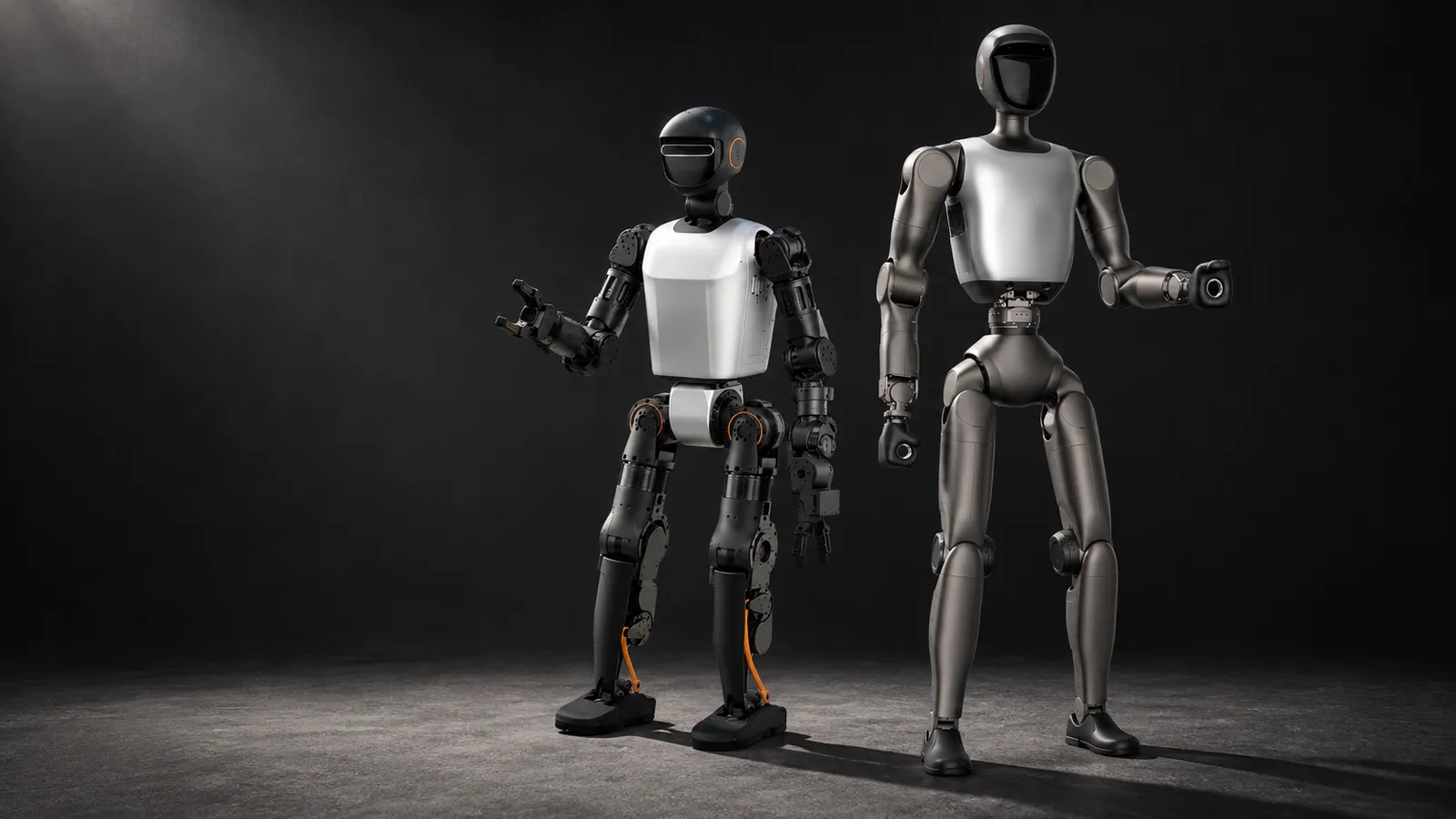
The Booster T1 is a RoboCup robot first: a compact biped with an open SDK, an Isaac Gym locomotion framework and an official RoboCup demo that plays full matches, and Booster now headlines RoboCup 2026 championship wins on its home page. It is also a robot whose maker never shipped a teleoperation stack. Press coverage called the T1 a platform for teleoperation-first work, but the code Booster publishes is for locomotion, deployment and robot soccer, not for driving the arms from a headset. In 2026 Booster replaced it on its website with the T2, a larger 31-DoF robot with optional hands and Jetson Thor compute. This page covers both: how to teleoperate a T1 you already own, and what changes when you move to a T2.
T1 or T2: where things stand in October 2026
Booster T1
Booster T2
For teleoperation the important jump is the arms. Seven joints per arm and a 3-DoF waist let a T2 present a hand at the position and angle an operator's hand is at, which is what makes hand-tracked VR data usable. The T2 product page lists secondary development as supported on both editions, so you do not pay extra for SDK access.
As of October 2026, foreign-produced advanced robotic devices are on the FCC Covered List under FCC public notice DA 26-786 (July 28, 2026), unless the Department of War grants them a Conditional Approval. The FCC definition covers mobile robots, including humanoids, quadrupeds and autonomous mobile robots, that weigh over 4.4 lb with any base or dock and have a sensor, network connectivity and control software, when they do not qualify as US-made under the federal Buy American test, whatever the nationality of the maker. Covered models cannot receive new FCC equipment authorizations, which most devices need before they can be imported or sold in the US, while the FCC says models it authorized earlier can still be imported, sold and used; US buyers should confirm the current status with the seller.
What Booster gives you to build on
Booster Robotics SDK
booster_gym, booster_train and booster_deploy
Booster Studio
robocup_demo
Building a teleop stack on a Booster robot
With no official teleop app, every Booster data program assembles the same pieces. The pattern that works keeps balance on the robot and puts only intent on the network.
Walking
Arms
Video
Recording
Stop
Rehearse the whole stack in simulation first. booster_deploy runs the same control code in MuJoCo or Webots as on the real robot, so you can test retargeting, limits and the stop path before an operator touches hardware.
Data from a custom Booster stack
Booster's public repositories include robot descriptions and example motion data, but no teleoperation datasets, so there is no default schema to copy. That is a freedom and a risk. Decide the shape of an episode before the first session and write it down in a dataset card that ships with the data.
Observation
Action
Metadata
Recording straight to LeRobot format keeps the data usable with the open training tools without a conversion step. Our data collection guide covers formats and quality checks.
Hands or grippers on the T2
The T2 offers a standard end effector, a gripper or a dexterous hand, and the choice shows up in the price. On US storefronts in August 2026, Grabarobot found the Edu and Pro at $42,999 and $48,999 with a gripper, and $48,999 and $54,999 with a dexterous hand. For a first dataset, the gripper is usually the better buy: a pinch retargets cleanly from hand tracking, operators reach a consistent technique quickly, and the clean-episode rate is higher. A dexterous hand is worth it when the task needs finger-level work, such as tool use or in-hand reorientation, and then operators need more practice before their episodes count.
Whole-body or upper-body data
Booster positions the T2 for whole-body tasks: legs, waist, arms, head and end effectors coordinated for bimanual manipulation and manipulation while walking. A joystick-plus-VR setup records upper-body data with a walking command, which covers most tabletop and shelf work. True whole-body data, where the legs are part of the demonstration, needs body tracking for the operator (a motion-capture suit or a VR full-body solution) and a whole-body controller on the robot. With Jetson Thor on the Pro, the compute for that controller is on board; the integration is yours to build.
Latency and the operator link
Keep the IK, limits and stop on a computer on the robot's network, and let the operator's poses and the video cross the internet. Below roughly 100 ms round trip, hand-tracked grasping feels direct. Between 100 and 200 ms, slow the arm and accept fewer fine grasps per hour. Above that, walk and position the robot remotely and leave fine manipulation to a policy the operator supervises. Our latency guide has the budgets by task.
What a good Booster operator does
Moving from a T1 to a T2
Treat the T2 as a new robot type. Its body, arm kinematics, cameras and compute differ from the T1's, so T1 datasets and policies do not transfer directly. Locomotion policies trained in booster_gym for the T1 need retraining for the T2's body, and any teleop retargeting needs new kinematics. What carries over is the software pattern: the same SDK family, the same deploy-in-sim-then-real workflow, Booster Studio, and your operators' protocol. Keep T1 and T2 episodes in separate datasets with the robot type in the metadata. If you need a smaller, cheaper Booster for fleets, see the Booster K1.
Takeover and fallback
Once a T2 runs a policy, the custom teleop stack doubles as the takeover channel. Define what triggers a handover, keep the stop one action away, and record every takeover as a labeled correction episode for the next training run. Our human-in-the-loop guide covers the escalation design.
How RoboPilots runs Booster teleoperation
Your robot stays at your site. We agree the teleop stack with you, whether you have built one or need one assembled on the Booster SDK, set up the operator link through a computer on your network, and train a dedicated group of operators on your unit and your task protocol. Several humanoid makers have sent us robots to test our operating protocols, and that is the starting point for every new platform.
One-week trial
Coverage
Data
Interfaces, specs and sources
- Booster Robotics SDK (C++ / Python)
- Booster Studio
- booster_gym (Isaac Gym)
- booster_train / booster_deploy
- Custom VR teleop
- Handheld remote controller
Availability: The T1 is no longer listed on booster.tech, which now shows only the T2 and K1. The T2 launched on July 13, 2026 in Education and Professional editions; Booster sells it through its store and sales team without a public price. On US storefronts it was listed at $32,999 (Edu) and $37,999 (Pro) as of August 11, 2026, according to Grabarobot's price survey. US buyers: see the FCC note on foreign-produced robots (DA 26-786).
Specs are the maker's published figures, checked on . RoboPilots is not affiliated with Booster Robotics; product names are trademarks of their owners.
- Booster Robotics home page (current products)
- Booster T2 product page and specifications
- Booster T2 launch release (Newsfile, July 13, 2026)
- Booster developer guide
- Booster Robotics SDK (GitHub)
- booster_gym (GitHub)
- Booster Robotics repositories, including robocup_demo (GitHub)
- Origin of Bots: Booster T1 overview
- B-Human code release: handling the Booster
- Grabarobot: humanoid price guide 2026 (US storefront prices, August 11, 2026)
- FCC public notice DA 26-786: foreign-produced robots added to the Covered List (July 28, 2026)
Frequently asked questions
- Is the Booster T1 discontinued?
- Booster no longer lists the T1 on its website, which shows only the T2 and K1. Its developer guide and open-source code still support the T1.
- Does Booster have an official teleoperation stack?
- Not as of October 2026. Booster publishes an SDK, locomotion training and deployment code, and Booster Studio, but no VR teleop app, so teams build their own on the SDK.
- What is the difference between the Booster T2 Edu and Pro?
- The body, joints, sensors and battery are the same. The Education edition uses an ARM processor rated at 375 TOPS; the Professional edition uses a Jetson Thor T5000 rated at 2,070 TFLOPS.
- How much does the Booster T2 cost?
- Booster does not publish a price on its site. Grabarobot found it listed at $32,999 for the Edu and $37,999 for the Pro on US storefronts on August 11, 2026, with gripper and hand packages costing more.
- Can I develop on every Booster T2?
- Yes. Booster lists secondary development as supported on both the Education and Professional editions.