Robots · Humanoids
Booster K1 teleoperation: what a 95 cm, 4-DoF-arm humanoid is good for, and how to run a fleet
The K1 is a small, tough, inexpensive humanoid built for competition and teaching. It can be a good data robot, as long as you collect the kind of data its body can actually produce.
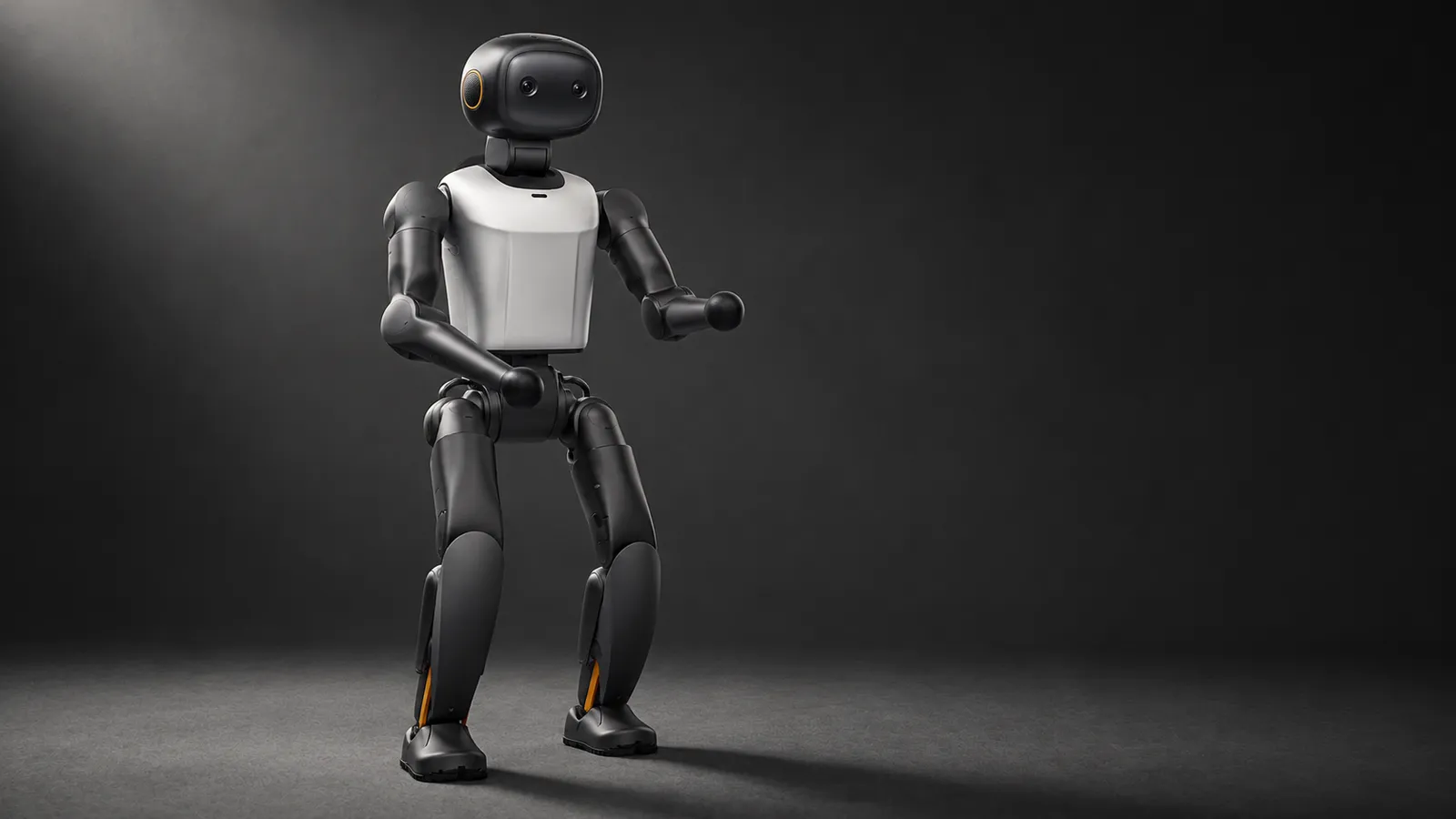
- Height and weight
- About 95 cm; about 19.5 kg
- Degrees of freedom
- 22: 6 per leg, 4 per arm, 2 in the head
- Max peak torque
- 60 N·m, dual joint encoders
- Speed
- Walking 2 m/s; turning 1.5 rad/s
- Compute by edition
- Geek 48 TOPS; Education 117 TOPS; Professional 200 TOPS
- Battery by edition
- Geek 2 Ah, about 20 min; Education and Professional 5 Ah, about 1 h 10 min (walking at 1.1 m/s)
- Sensors
- Binocular head camera, 9-axis IMU, microphone array
- Secondary development
- Supported on all editions
Updated
The Booster K1 is a 95 cm, 19.5 kg humanoid that walks at up to 2 m/s, recovers its balance after a push, and costs a fraction of a full-size robot. Booster built it for competitions, education and entertainment, and it shows: the K1 has 6-DoF legs, a 2-DoF head with a binocular camera, and 4-DoF arms with no hand on the spec sheet. 36Kr reported in May 2026 that Booster had shipped more than 1,000 units to over 400 customers in more than 20 countries. For teleoperation and data, the K1 is excellent at some things and the wrong robot for others. This page sorts which is which, and covers what it takes to run several of them with remote operators.
Pick the edition by battery, not by compute
Booster sells the K1 in three editions with the same body. All three support secondary development; they differ in compute, battery and warranty. For a data program, battery is the line that matters.
Geek
Education
Professional
The K1 supports charging while in use through a magnetic port. On a fleet, a tethered charge between episodes can stretch an Education unit through a long session, as long as the cable stays out of the task.
As of October 2026, foreign-produced advanced robotic devices are on the FCC Covered List under FCC public notice DA 26-786 (July 28, 2026), unless the Department of War grants them a Conditional Approval. The FCC definition covers mobile robots, including humanoids, quadrupeds and autonomous mobile robots, that weigh over 4.4 lb with any base or dock and have a sensor, network connectivity and control software, when they do not qualify as US-made under the federal Buy American test, whatever the nationality of the maker. Covered models cannot receive new FCC equipment authorizations, which most devices need before they can be imported or sold in the US, while the FCC says models it authorized earlier can still be imported, sold and used; US buyers should confirm the current status with the seller.
What a K1 body can and cannot demonstrate
The K1 product page lists 22 joints: 6 per leg, 2 in the head, and 4 per arm (shoulder pitch, roll and yaw, and the elbow). There is no wrist and no hand in the spec, so the K1 cannot hold an object at a chosen orientation or grasp the way a manipulation robot does. Plan the data around that.
Good fit
Possible with limits
Wrong robot
How to drive a K1 remotely
Booster ships no VR teleoperation app for the K1. Out of the box you get a joystick, the Booster app, and six built-in Agents (Booster for daily actions, Soccer, Hi Chat, Teach, Dance and Lion Dance), according to the K1 manual. For anything beyond that, teams build on Booster's developer tools.
Joystick plus the locomotion controller
VR head and arm teleop on the SDK
Motion capture to whole-body motion
Teach Agent
Whole-body versus upper-body data on a K1
On most humanoids, the valuable teleop data is upper-body manipulation with a walking command attached. On the K1 it is the other way round. The legs and balance are the interesting part, and the arms mostly add expression and balance. If your goal is a locomotion or motion-tracking policy, record the full body: all 22 joint states, the IMU, the velocity or motion-target command, and the head camera. If your goal is a soccer or navigation policy, add the camera stream at full rate and the ball or target position if you track it. In both cases the action has to be defined once and kept: joint targets from the retargeter, or velocity commands to the walking controller, not a mix.
Running a K1 fleet
Low cost and a small body make the K1 a natural fleet robot, and Booster's own home page lists the T2 and K1 under its competition solution. The constraints are operational.
Battery rotation
Identical units
Falls are part of the job
One operator per robot for direct control
Latency for locomotion teleop
Walking commands tolerate delay well because the balance loop runs on the robot. An operator steering a K1 across a field is comfortable up to about 150 to 200 ms round trip. Head-tracked active vision is more sensitive: much past 100 ms, the view lags the operator's head and some people feel it within minutes. Fast ball skills need the operator close or the skill in a policy. Our latency guide has the budgets by task.
What a good K1 operator does
Software maturity
The K1 is newer than the T1, and third-party support is still catching up. B-Human's 2025 code release says the real K1 was only partially supported at the time, with its learned walk tested once as a proof of concept. Booster's own tools cover the K1: the developer guide, booster_train and booster_deploy, and the official robocup_demo for the T1 and K1. Budget time for integration work that a more established robot would not need. Record the firmware version of every unit before the first session (the K1 manual has a section on it), and update the whole fleet together rather than one robot at a time.
K1, T2 or another small humanoid?
Within Booster's range, the step up is the T2: 1.4 m, 7-DoF arms, a 3-DoF waist and optional grippers or dexterous hands, at two to three times the K1's US storefront price, depending on editions, in Grabarobot's August 2026 survey. Choose the K1 when the data is about moving: walking, balance, motion tracking, soccer and expressive motion, across many robots. Choose the T2, or another humanoid with real arms and hands, when the data is about manipulating objects. A mixed program often uses both: K1s for locomotion data at fleet scale, a few larger robots for manipulation.
Whatever the robot, keep each body in its own dataset, with the robot type and edition in the metadata. Our data collection guide covers episode structure and the quality checks that catch bad episodes early.
Takeover and fallback
Where K1s run policies, for example in a demonstration space or an education program, the operator is the fallback: the robot or a monitor flags a problem, an operator takes control with the joystick or the teleop stack, and the takeover is logged as a correction. Our human-in-the-loop guide covers the escalation design.
How RoboPilots runs K1 teleoperation
Your robots stay at your site. We agree the stack with you, from joystick-only locomotion to a custom VR or mocap setup, connect operators through a computer on your network, and train a dedicated group of operators on your units and your protocol, including fall handling and battery rotation. Several humanoid makers have sent us robots to test our operating protocols, and every new program starts from that base.
One-week trial
Coverage
Data
Interfaces, specs and sources
- Booster Robotics SDK (C++ / Python)
- Booster Studio and Agents
- booster_train (Isaac Lab)
- booster_deploy (MuJoCo, Webots)
- Teach Agent (guided motion recording)
- Custom VR or mocap teleop
Availability: Buyable. Booster sells the K1 through its store without a public price on its product page. On US storefronts it was listed from $10,999 (Geek) to $16,999 (Pro) as of August 11, 2026, according to Grabarobot's price survey. In China it was reported from RMB 39,900 in May 2026, after a limited-time price from RMB 29,900 at launch (36Kr Japan). US buyers: see the FCC note on foreign-produced robots (DA 26-786).
Specs are the maker's published figures, checked on . RoboPilots is not affiliated with Booster Robotics; product names are trademarks of their owners.
- Booster K1 product page and specifications
- Booster K1 product manual: overview
- Booster Robotics home page
- Booster T2 product page (for comparison)
- Booster developer guide
- Booster Robotics repositories (GitHub)
- B-Human code release: handling the Booster
- Grabarobot: humanoid price guide 2026 (US storefront prices, August 11, 2026)
- 36Kr Japan: Booster K1 price and shipments (May 2026)
- 36Kr Japan: Booster K1 launch price (December 2025)
- FCC public notice DA 26-786: foreign-produced robots added to the Covered List (July 28, 2026)
Frequently asked questions
- Which Booster K1 version can I develop on?
- All of them. Booster lists secondary development as supported on the Geek, Education and Professional editions. They differ in compute, battery and warranty.
- Can the Booster K1 be teleoperated with VR?
- Not with an official app. Teams build VR teleop on the Booster SDK, usually driving the 2-DoF head from the headset and steering the walk with a controller, while the 4-DoF arms follow a simplified pose.
- How long does the Booster K1 battery last?
- Booster lists about 20 minutes of walking for the Geek edition and about 1 hour 10 minutes for the Education and Professional editions, at 1.1 m/s.
- How much does the Booster K1 cost in the US?
- Booster does not show a price on its product page. Grabarobot found US storefront listings from $10,999 for the Geek to $16,999 for the Professional edition on August 11, 2026.
- Does the Booster K1 have hands?
- Its spec lists 4-DoF arms with no wrist or hand, so it is not suited to grasping tasks without a custom end effector.