Robots · Drones
DJI Dock 2 remote operations: the dock with DJI's own FAA waiver baseline
Dock 2 is the DJI dock generation that DJI built its US BVLOS waiver material around. Here is how it is flown remotely, what it delivers, and what an operator has to watch.
- Aircraft
- Matrice 3D (mapping) or Matrice 3TD (thermal), one per dock
- Aircraft flight time
- Up to 50 min (DJI lab test)
- Max operating radius
- 10 km
- Charging
- 32 min, 20% to 90%
- Wind
- 12 m/s in flight; 8 m/s for takeoff and landing
- Protection and temperature
- Dock IP55, -25 to 45 °C; aircraft IP54
- Video link
- O3 Enterprise; about 110 to 150 ms aircraft to dock; 15 km max (FCC)
- Dock weight and power
- 34 kg; 100 to 240 V AC, max 1000 W; backup battery over 5 h
Updated
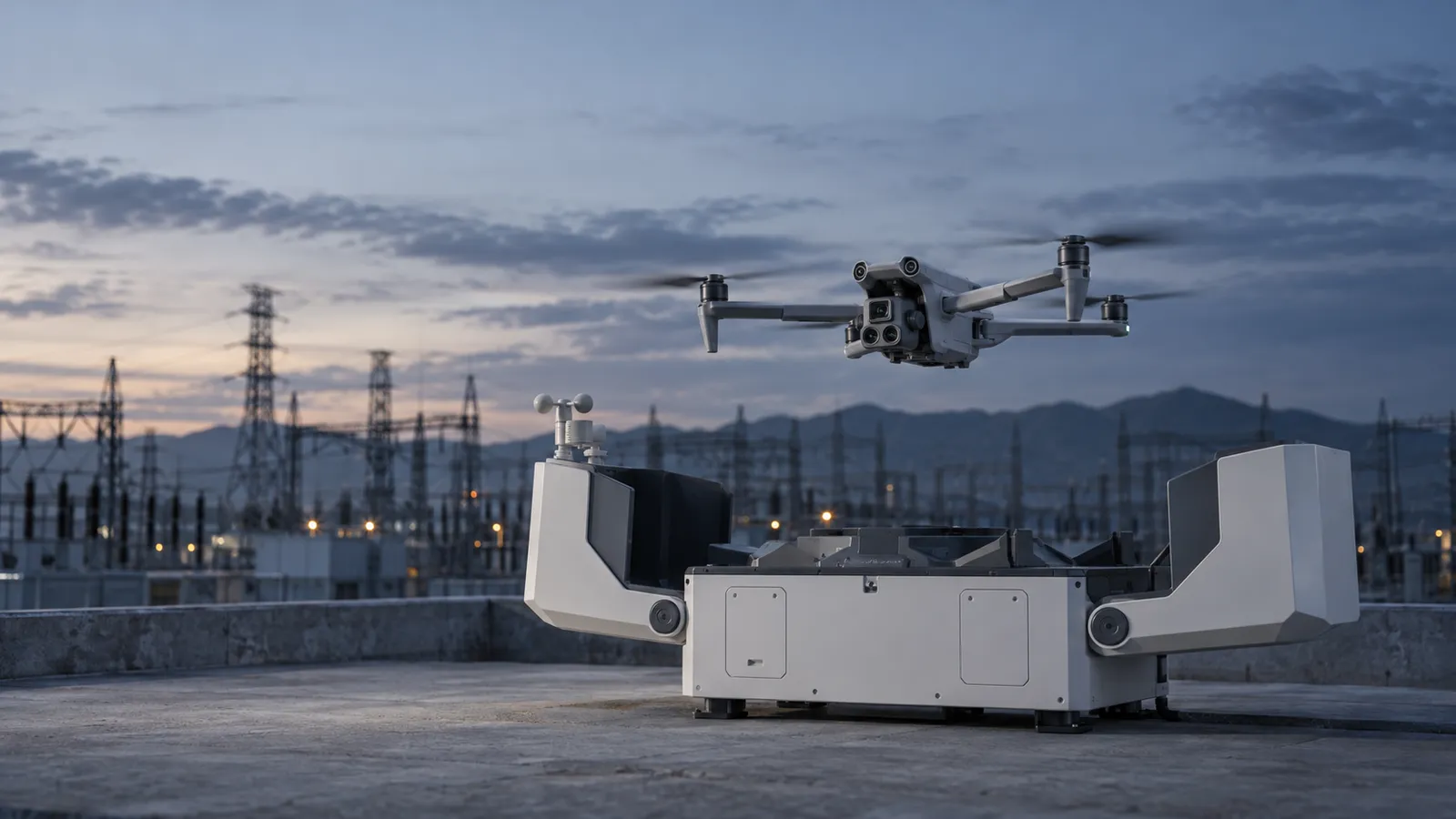
DJI Dock 2 is a 34 kg drone-in-a-box that houses a Matrice 3D or 3TD, charges it, and launches it on schedule or on demand from DJI FlightHub 2. Its successor, Dock 3, is now on sale, but installed Dock 2 units keep working, and Dock 2 has one thing Dock 3 does not yet appear in: DJI's own FAA-approved BVLOS waiver baseline. For owners, the question is not whether to keep flying Dock 2. It is who flies it, how many docks one person can cover, and how the data reaches the people who need it.
Why Dock 2 is the waiver-ready dock
In its BVLOS resource library, dated December 2024, DJI says it has obtained FAA approval for BVLOS waivers using visual observers up to 400 ft and standard shielding for two baseline configurations: FlightHub 2 with the M30 Dock version and the original DJI Dock, and FlightHub 2 with the Matrice 3D series and Dock 2. DJI offers waiver safety-explanation templates to US operators preparing their own applications, and for the EU and Australia it publishes a Dock 2 operations manual, SORA template, functional hazard assessment and robustness report.
What standard shielding means
What the visual observer does
What changes if you add tools
A waiver is issued to an operator, not to a dock, and each one carries its own conditions. The practical value of the baseline is that the safety case for this exact hardware has been written before, which shortens the work. It does not replace it.
How Dock 2 is flown remotely
Dock 2 connects to the network over Ethernet and to FlightHub 2 in the cloud, or to a privately deployed instance. According to DJI's Dock 2 FAQ, operators can manually control the aircraft's flight and gimbal angles from FlightHub 2, and FlyTo tasks send the aircraft straight to a point. Teams with their own software connect through the DJI Cloud API instead.
Scheduled routes
FlyTo on demand
Manual control
On-site fallback
One dock, one aircraft. DJI's Dock 2 FAQ says a dock cannot serve multiple drones, and that one drone with multiple docks is not supported on the current firmware. If your plan depends on aircraft hopping between docks, check the firmware notes or look at Dock 3, which supports Multi-Dock Tasks.
Siting and add-ons that affect remote work
DJI asks for an open area with power and internet, at altitudes up to 4,000 m. The aircraft finds the dock with RTK positioning and marker recognition, and a sliding ramp centers it on the landing platform, so landing reliability depends on a clean RTK setup and an unobstructed approach. The Matrice 3D has an E-Port for third-party payloads such as speakers and spotlights, an E-Port Lite that supports a parachute, and the dock can take an edge computing module for processing on site. Each add-on changes the preflight checklist, and a parachute or speaker may also be something your waiver or local procedure expects.
The link and what it allows
The aircraft talks to the dock on DJI O3 Enterprise, which DJI specifies at about 110 to 150 ms latency, with a maximum range of 15 km under FCC rules in clean conditions. FlightHub 2 shows live view at 540p, 720p or 1080p at 30 fps; DJI says dock-to-FlightHub latency depends on the network and the pilot's computer. That is fast enough for route supervision, FlyTo responses and slow manual inspection at altitude, and not for close maneuvering where a quarter-second of delay decides whether you touch a structure. The aircraft's six-direction obstacle sensing covers much of that gap, with one exception worth briefing: a 10° blind spot in the upper rear. More on what delay does to manual control in our latency guide.
Data: what comes back after each flight
Media moves in two hops. After landing, the aircraft transfers its files to the dock and deletes its copies; the dock uploads them to the cloud and deletes its own. Nothing transfers during flight, though flight status streams in real time. In the Cloud API documentation, DJI notes that on the latest Dock 2 firmware, infrared, visible and split-screen video files carry the aircraft's position and altitude and the gimbal attitude, and the PPK files (.obs, .rtk, .mrk, .nav) and RTCM data upload with the media after a mission.
Matrice 3D for mapping
Matrice 3TD for inspection and security
Status and logs
Running Dock 2 from a remote operations center
One-to-many supervision
Mission planning
Takeover
Airspace and visual observers
Data delivery
What a good Dock 2 pilot watches for
Dock 2 vs Dock 3
DJI calls Dock 3 an iterative upgrade: IP56, -30 to 50 °C instead of -25 to 45 °C, a 12 m/s wind limit against Dock 2's 8 m/s for takeoff and landing, a 27-minute recharge, O4+ video with lower live-view latency, vehicle mounting and Multi-Dock Tasks with the Matrice 4D. Dock 2, at 34 kg, is the simpler fixed install, and it is the configuration DJI's FAA waiver baseline names. If you are adding sites, Dock 3 is the current product. If you already own Dock 2, it remains a capable dock with years of firmware support ahead; programs still running the original Dock and M30 are covered on our Matrice 30 page.
US regulatory notes, as of October 2026
FCC
Proposed sales cut-off
Tariffs
BVLOS
This summarizes public sources, not legal advice. Confirm your own approvals with the FAA and counsel.
How RoboPilots runs Dock 2 programs
Your docks and FlightHub 2 workspace stay yours. We train a dedicated group of Part 107 pilots on your docks, your sites and the procedures your waiver assumes, including the VO and abort routines, before they fly a live mission. They fly inside your approvals and document every flight.
One-week trial
Coverage
Data
Interfaces, specs and sources
- DJI FlightHub 2 (cloud or private deployment)
- DJI Cloud API
- DJI RC Pro Enterprise (on-site)
- Edge computing module
- E-Port third-party payloads
Availability: Dock 2 units already installed keep flying: the FCC's Covered List action of 22 December 2025 does not ground owned equipment, and FCC public notice DA 26-454 (May 2026) lets authorized DJI devices keep receiving firmware updates until at least 1 January 2029. The proposed DA 26-758, not final as of October 2026, would end import and sale of previously authorized foreign docking stations after a wind-down. Check current availability of new units with a dealer.
Specs are the maker's published figures, checked on . RoboPilots is not affiliated with DJI; product names are trademarks of their owners.
- DJI Dock 2 product page
- DJI Dock 2 FAQ
- DJI Dock 2 specifications
- DJI Dock 3 FAQ (Dock 3 vs Dock 2)
- DJI Enterprise: The Ultimate BVLOS Resource Library (Dec 2024)
- DJI Cloud API: dock media management (GitHub docs)
- DroneDJ: FCC extends DJI and Autel firmware waiver to 2029 (May 2026)
- DroneXL: DJI's DFR dock playbook and the FCC proposal (Aug 2026)
- DroneXL: DJI at Commercial UAV Expo, Covered List and tariffs (Sep 2026)
- PickDrones: Part 108 BVLOS rule at OIRA (Sep 2026)
Frequently asked questions
- Can operators manually control a Dock 2 drone through FlightHub 2?
- Yes. DJI's Dock 2 FAQ says operators can manually control the aircraft's flight and gimbal angles from FlightHub 2. On site, the Matrice 3D can also be paired with a DJI RC Pro Enterprise.
- Does DJI Dock 2 support one drone with multiple docks?
- DJI's Dock 2 FAQ says a dock cannot serve multiple drones and that one drone with multiple docks is not supported on the current firmware. Dock 3 supports Multi-Dock Tasks.
- What is the difference between the Matrice 3D and 3TD?
- The 3D has wide and tele cameras with mechanical shutters and is DJI's recommended model for high-precision mapping. The 3TD adds a thermal camera for inspection and security but does not meet high-precision mapping requirements.
- What is the minimum time between Dock 2 missions?
- DJI quotes 32 minutes to charge from 20% to 90% at 25 °C, which is the minimum interval between two missions. Dock 2 does not swap batteries.
- What happens to DJI Dock 2 in a power outage?
- The backup battery runs the dock for more than five hours, enough to return and land the aircraft. During the outage the dock does not charge the aircraft, run air conditioning or heat the cover.
- Is DJI Dock 2 approved for BVLOS?
- DJI says the FAA has approved BVLOS waivers with visual observers up to 400 ft and standard shielding for FlightHub 2 with the Matrice 3D and Dock 2. Waivers are issued to operators, so each program still needs its own.