Robots · Robot arms
Trossen WidowX AI teleoperation: leader arms, the LeRobot plugin and data OpenPi can train on
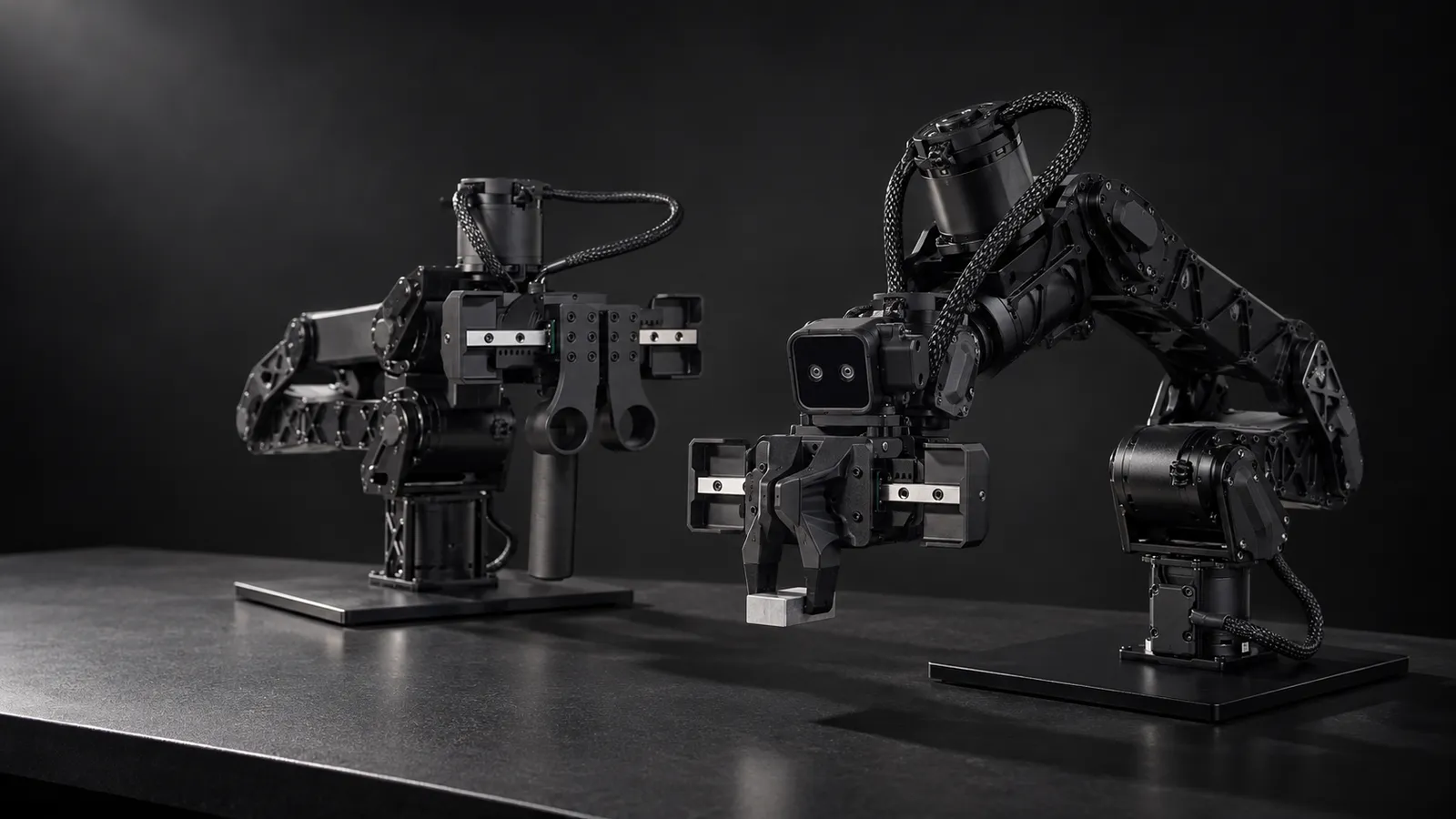
The WidowX AI is Trossen's machine-learning arm, sold on its own as a leader or a follower and as the arm in the single-arm Solo AI kit. This page covers how to drive it, how to record it, and the version traps between LeRobot and OpenPi.
- Degrees of freedom
- 6 + gripper
- Payload
- 1.5 kg
- Reach
- 700 mm (product page); 0.769 m (specification docs)
- Repeatability
- 1 mm
- Arm weight
- 4 kg
- Communication
- Ethernet; UDP for real-time commands and state, TCP for configuration
- Gripper
- 0.04 m max finger displacement, 100 N max gripping force
- Configurations
- Base, Leader, Follower (Follower ships with a RealSense D405 and mount)
Updated
The WidowX AI is Trossen Robotics' arm for machine-learning research: 6 joints plus a gripper, a 1.5 kg payload, 1 mm repeatability and a 4 kg body, sold in Base, Leader and Follower configurations. It is the arm behind Trossen's single-arm Solo AI kit, and it comes with a maintained LeRobot plugin and an OpenPi integration. That makes it one of the shortest paths from an empty bench to a trained ACT, smolVLA or π0 policy. The hard part is not getting it to move. It is recording episodes that are consistent enough to train on, at a rate a team can sustain.
Solo AI, a standalone pair, or a bimanual kit
Trossen describes the Solo AI as "a compact, single-arm research platform for machine learning in the field" that "can be used for teleoperation, recording datasets, and testing inference". It is listed at $11,385.95 on Trossen Robotics as of October 2026. Trossen says Solo AI "is designed for data collection in the field and for those NOT needing bimanual manipulation". For two-arm work it sells bimanual kits built on the same arm: the Stationary AI for a controlled lab, where arm and camera placement stay the same between sessions, and the Mobile AI on a wheeled base.
If you already have cameras, compute and a table, buying a single leader plus a single follower gets you the same arm hardware. The Follower configuration includes a RealSense D405 on an arm mount; the Leader swaps the gripper for an ambidextrous hand grip with sliding-rail finger pinchers, which is what the operator holds.
One thing to know before you buy: Trossen's arm specification docs now call the WidowX AI "the previous-generation arm" and list the WidowX Core, Pro and Heavy as the current line, while the WidowX AI is still on sale. If you are starting from zero, compare it with the WidowX Core, Pro and Heavy first. The software story below (lerobot_trossen, OpenPi, public datasets and models) is today much deeper for the WidowX AI.
Three ways to drive a WidowX AI
The WidowX AI leader arm (default)
Trossen VR on a Meta Quest
Hand guiding in gravity compensation
The driver also ships a `teleoperation` demo that Trossen describes as teleoperation "with force feedback", alongside Cartesian impedance and admittance examples. LeRobot's leader/follower loop does not use force feedback, so treat the demo as a starting point if contact feel matters for your task, not as part of the standard recording path.
The control loop: 30 Hz by default, and what that means remotely
Under the hood, the arm controller takes real-time commands and returns state over UDP, with TCP for the handshake, configuration and logs. Each joint can run in idle, position, velocity, external-effort or raw effort mode. Commands carry a goal time: above 0.2 s the driver uses quintic interpolation for positions, between 0.001 s and 0.2 s it interpolates linearly, and at 0.001 s or less the goal applies immediately. Leader/follower streaming lives in that short-goal-time regime.
In the LeRobot plugin the follower's `loop_rate` defaults to 30 Hz, and Trossen's camera examples run at 640×480, 30 fps. Two other defaults shape how teleoperation feels: `max_relative_target` (5.0 on the single-arm follower, unset on the bimanual one) caps how far a single step can move, and `min_time_to_move_multiplier` (3.0) sets the minimum move time as the multiplier divided by fps, which is 0.1 s at 30 fps. Raise the multiplier and motion gets smoother but lags; lower it and motion gets faster but can turn jerky. If your policy will run at 20 Hz, decide up front whether you record at 20 Hz or record at 30 Hz and resample, and keep it the same for the whole dataset.
At 30 Hz a control step is about 33 ms. An operator on a 100 ms round trip is three steps behind the camera; at 200 ms, six. Tabletop transfer, sorting and handovers stay workable well into that range. Tight insertions and cloth manipulation do not. Two practical rules for remote operation on this arm:
Keep the arm loop local
Let the follower clamp, not the operator
Our latency guide has budgets by task type. Note too that OpenPi inference is a different loop: Trossen's tutorial runs control at 30 Hz to match the cameras and warns that querying the policy too often can drop the effective control rate to around 10 Hz.
Data: LeRobot v3 for recording, LeRobot v2 for OpenPi
The plugin requires `lerobot >= 0.6.0`, auto-registers its robot and teleoperator types, and writes standard LeRobot datasets. Trossen's single-arm example records 10 episodes of 45 s with a 15 s reset; the bimanual example records 25 episodes of 60 s. Velocity, effort and external-effort observations are off by default (`include_velocity`, `include_effort`, `include_external_effort`). Turn on the ones you want before the first episode, because adding a field later splits the dataset in two.
For a concrete reference, TrossenRoboticsCommunity/widowx_ai_orange_block_transfer is a bimanual set in LeRobot format v3.0: 20 episodes, 13,180 frames at 30 fps, a 14-value state and action (six joints plus the gripper carriage per arm), and four AV1 camera streams (high, low and one per wrist). The same Hugging Face organization publishes ACT, smolVLA, π0 and π0.5 checkpoints trained on WidowX AI data, such as smolvla-handover-cube-widowxai and pi0-handover-cube-widowxai.
The version trap: Trossen's OpenPi tutorial trains on LeRobot dataset v2 and warns that "newer dataset formats (v3.0+) have breaking changes that are not compatible with OpenPI's training pipeline". Its collection step uses the older Interbotix LeRobot fork (v2.1), which Trossen's docs now mark as deprecated in favor of the plugin. If π0 or π0.5 is the target, decide the dataset version before collection, or budget a conversion step. ACT and smolVLA train from the plugin's v3 data directly.
We deliver episodes in LeRobot, RLDS or HDF5, and the same rules apply whichever you pick: one action convention (joint targets) for the whole set, one clock, a fixed start pose, and an honest success flag. The data collection guide goes deeper on checks.
What a good WidowX AI operator does
That last point is about staffing as much as skill. Trossen's example reset window is 15 s. A remote operator can only hold that pace if someone near the bench puts objects back, swaps parts and clears drops. Depending on the task, one technician may be able to cover more than one station; plan for that role from day one.
WidowX AI, WidowX Core/Pro/Heavy or xArm 6?
Against the newer Trossen line, the WidowX AI has the deeper software: a released LeRobot plugin with single, bimanual and mobile types, OpenPi recipes, and public datasets and models. The Core, Pro and Heavy add payload (2 kg, 4 kg and 6 kg), a controller Trossen says runs above 600 Hz, and the Glide passive leader. Against a UFACTORY xArm 6, the WidowX AI has a far smaller payload and a looser 1 mm repeatability, but it is lighter, ships as a matched leader/follower pair and records through a maintained plugin, where the xArm relies on community or UFACTORY integrations.
How RoboPilots runs WidowX AI teleoperation
The arms stay in your lab. We agree the input with you (your WidowX AI leaders or Trossen VR), set up the recording host on your side of a VPN, and train a dedicated group of operators on your unit and your task protocol before the first recorded episode.
One-week trial
Coverage
Data
Interfaces, specs and sources
- lerobot_trossen plugin
- WidowX AI leader arm
- Trossen VR (Meta Quest)
- Trossen Arm driver (C++/Python)
- ROS 2
- OpenPi (Pi0 / Pi0.5)
Specs are the maker's published figures, checked on . RoboPilots is not affiliated with Trossen Robotics; product names are trademarks of their owners.
- Trossen Robotics: WidowX AI product page
- Trossen Robotics: Solo AI product page
- Trossen Arm docs: Trossen VR teleoperation (Meta Quest)
- Trossen Arm docs: WidowX AI specifications
- Trossen Arm docs: arm specifications (current and previous generation)
- Trossen Arm docs: driver concepts (modes, UDP/TCP, interpolation)
- lerobot_trossen plugin (GitHub)
- Trossen Arm docs: LeRobot plugin configuration
- Trossen Arm docs: OpenPi tutorial
- TrossenRoboticsCommunity/widowx_ai_orange_block_transfer (Hugging Face)
Frequently asked questions
- Does LeRobot support the Trossen WidowX AI?
- Through Trossen's official lerobot_trossen plugin, not through LeRobot's built-in robots. The plugin needs lerobot 0.6.0 or newer and registers single-arm, bimanual and Mobile AI robot types plus matching leader teleoperators.
- What is the difference between the WidowX AI and the Solo AI?
- The WidowX AI is the arm, sold as a Base, Leader or Follower. The Solo AI is Trossen's single-arm kit built around it, aimed at teleoperation, dataset recording and inference testing outside a fixed lab.
- What control rate does the WidowX AI record at in LeRobot?
- The plugin's follower loop rate defaults to 30 Hz, and Trossen's camera examples run at 30 fps. You can change it, but keep one rate for the whole dataset.
- Can I train Pi0 or Pi0.5 on WidowX AI data?
- Yes. Trossen publishes an OpenPi tutorial and fine-tuned checkpoints. The tutorial trains on LeRobot dataset v2 and warns that v3.0 datasets are not compatible with the OpenPi training pipeline, so plan the dataset version first.
- Can the WidowX AI be teleoperated with a VR headset?
- Yes. Trossen VR is a Meta Quest app plus a PC library that streams pose and gripper commands, with dual-arm support and deadman switches. The headset and PC must be on the same network.
- Is the WidowX AI precise enough for sub-millimetre work?
- Trossen specifies 1 mm repeatability, so sub-millimetre placement needs fixtures, compliance in the task design or a more precise arm.