Robots · Robot arms
Flexiv Rizon 4 teleoperation: force-controlled remote operation, the TDK and LeRobot data
The Rizon 4 is built around force control, and Flexiv ships its own teleoperation and data tools for it. The catch is knowing which software generation your arm belongs to before you build on any of them.
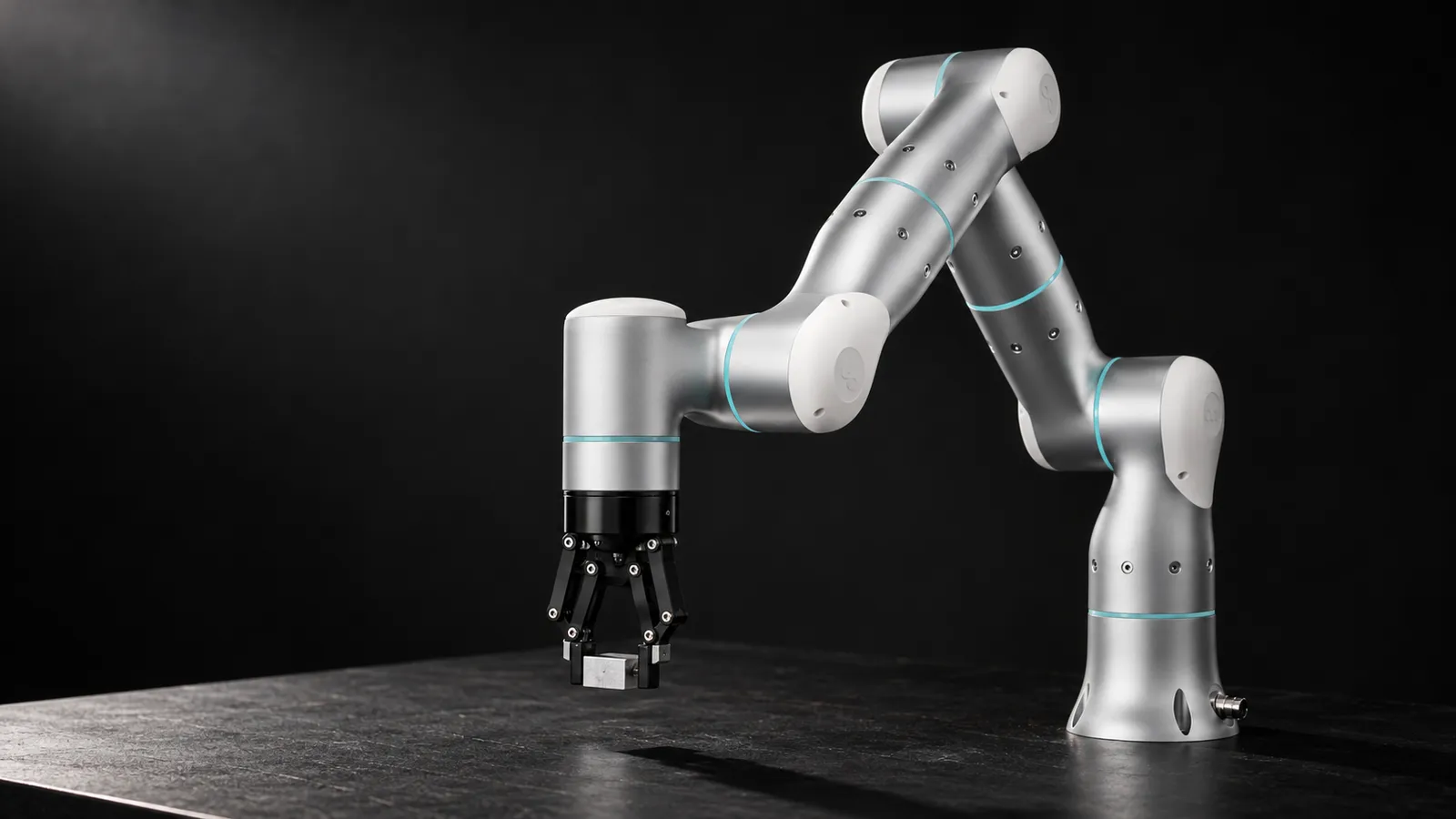
- Degrees of freedom
- 7
- Payload
- 4 kg
- Reach
- 876 mm (919 mm with F/T sensor)
- Weight
- 20 kg (21 kg with F/T sensor)
- Pose repeatability
- ±0.05 mm (ISO 9283)
- Force sensing accuracy
- 0.1 N (0.03 N with F/T sensor)
- Maximum TCP force
- 200 N (150 N with F/T sensor)
- Protection
- IP65; arm mounts in any orientation
Updated
The Flexiv Rizon 4 is a 7-axis arm with a 4 kg payload, an 876 mm reach and ±0.05 mm repeatability, weighing 20 kg. What sets it apart is force: Flexiv lists a force sensing accuracy of 0.1 N (0.03 N on the version with an added F/T sensor) and a maximum TCP force of 200 N on its Rizon product page, and describes the arm as keeping an optimized force-control posture during operation. That makes it a natural fit for teleoperated tasks where contact is the point: insertion, polishing, wiping, assembly with tight fits. Flexiv also publishes its own teleoperation and data-collection kits for it.
First, check your software generation
Flexiv's software is split into two lines, and the Rizon is on the older one. The flexiv_ros2 README says its default humble and jazzy branches now track the v2 line, which supports Flexiv's newer Enlight and MICO products, while the v1 line supports the Rizon 4, 4s, 4M, 4R, 10 and 10s (and AICO1/2), with a separate jazzy-v1 branch. The v2 line uses RDK v2.x, the v1 line uses RDK v1.x, and the README is explicit that the two "use incompatible RDK APIs and are not interchangeable."
Before writing any teleoperation code for a Rizon 4, pin the RDK and flexiv_ros2 versions to the v1 line, and confirm that any Flexiv tool you plan to use (TDK, Trainer) supports your arm's software version. Cloning the default branch is the fastest way to lose a day.
How the Rizon 4 is controlled
The Flexiv RDK provides low-level real-time and high-level non-real-time access in C++ and Python, and Flexiv says it exchanges real-time sensor measurements and control data at 1 kHz. Current RDK releases build on Linux, macOS, Windows and QNX, and real-time scheduling needs root privileges. On top of it, flexiv_ros2 offers ros2_control and MoveIt 2 integration, real-time and non-real-time joint torque and position control, a joint position or joint impedance mode for the ROS 2 joint interfaces, and a gripper package for Flexiv's Grav gripper.
The arm is driven by Flexiv's Hesper controller (12 kg, 500 W, 16 digital inputs and outputs, Profinet and Modbus TCP/IP), and operated on site with a teach pendant running Flexiv Elements and a handheld Motion Bar for mode switching, task start and emergency stop.
Flexiv's own teleoperation and data tools
Flexiv TDK
Flexiv Trainer
ROS 2 and your own input device
How to choose between them: use TDK when the operator should drive one Rizon from another (or from a device) with force feedback, especially across sites, and you are prepared to write the application around it. Use Trainer when the goal is a dataset and a policy on Rizon arms with minimal integration work, and LeRobot episodes are the format you want. Use your own ROS 2 stack when you already run a leader arm, VR rig or recording pipeline across several robot brands and want the Rizon to fit into it. In all three cases, confirm support for your arm's software line first.
Real-time control and the network
A flexiv_ros2 issue shows what a 1 kHz torque stream on a Rizon 4 expects. A user streaming joint torques from a 1000 Hz ROS 2 loop saw intermittent timeliness warnings, and sometimes a lockup that only a restart cleared. The maintainer explained that timeliness errors in real-time modes usually come from a workstation without a real-time kernel, and pointed to a configurable timeliness failure limit (2% by default). The root cause turned out to be a connection to the robot that dropped intermittently. Release v1.9.3 added explicit "Lost connection with the robot" errors and a transition to an error state that stops the robot.
The lesson for remote operation is the same as on every torque-controlled arm: the 1 kHz loop runs on a real-time PC with a solid wired connection next to the robot. The remote operator sends lower-rate targets, or force and motion goals, to that local controller. TDK's WAN mode is built the same way, with an edge computer at each end rather than the robot's real-time stream crossing the internet.
Latency for a remote Rizon operator
Under ~50 ms round trip
~100 to 200 ms
Above ~250 ms
Keep clocks synced at both ends as TDK recommends, so delays show up honestly in your logs. Our latency guide covers budgets by task.
In production: exceptions with the controller in charge
Flexiv states that the Rizon is fully CE and ETL certified and rated IP65. In a production cell, a remote operator handles exceptions, such as an insertion that failed its force check, a part that did not seat, a regrasp, or a jammed fixture, while the controller's safety functions stay in charge.
Stops stay local
Hand over at defined points
Lost link means stop
Restarts follow the site procedure
More on this model on our warehouse and factory page.
Data: LeRobot output, and keep the force
LeRobot itself has no Flexiv driver, and its third-party robots page lists no Flexiv plugin; Flexiv Trainer is the vendor route to LeRobot episodes. A small public example, xensedyl/bi_flexiv_rt_pick_and_place, uses a bimanual Rizon 4 setup: 30 fps, head and two wrist cameras plus four tactile sensor streams, and a 20-value state and action (TCP position and a 6D rotation for each arm, plus grippers), in LeRobot v3.0.
Notice what is missing from that schema: no measured force or torque channels. On an arm whose selling point is 0.1 N force sensing, that is a waste. If contact matters, record TCP wrench and joint torques alongside poses and cameras, log the control mode and impedance settings per episode, and label failed force checks as failures rather than discarding them.
What a good Rizon operator does
Rizon 4, Rizon 10 or another torque-sensing arm?
The Rizon 10 carries 10 kg over 941 mm and weighs 38 kg, with the same ±0.05 mm repeatability; choose it for heavier tools and parts. Every Rizon variant on Flexiv's page is rated IP65 and can be installed in any position. The Rizon 4 with added F/T sensor trades a little maximum force (150 N) for finer force sensing (0.03 N). Among other 7-axis torque-sensing arms, the KUKA LBR iiwa is the long-established industrial option and the Franka Research 3 is the common research platform.
How RoboPilots runs Rizon 4 teleoperation
The arm, the Hesper controller and the real-time PC stay with you. We confirm the software line with your team, agree the input device and control mode (TDK, Trainer or your own ROS 2 stack), install the operator client on your side of a VPN, and train a dedicated group of operators on your unit and your task protocol before any recorded episode or live exception counts.
One-week trial
Coverage
Data
Interfaces, specs and sources
- Flexiv RDK (C++, Python; 1 kHz RT)
- flexiv_ros2 (v1 line) + MoveIt 2
- Flexiv TDK (LAN and WAN teleop)
- Flexiv Trainer (LeRobot episodes)
- Flexiv Elements teach pendant
- Profinet, Modbus TCP/IP
Specs are the maker's published figures, checked on . RoboPilots is not affiliated with Flexiv; product names are trademarks of their owners.
- Flexiv Rizon product page and specifications
- Flexiv RDK
- flexiv_rdk (GitHub)
- flexiv_ros2 (GitHub)
- flexiv_ros2 issue #122: StreamJointTorque timeliness failure
- Flexiv TDK: Teleoperation Development Kit (GitHub)
- Flexiv Trainer (GitHub)
- LeRobot third-party robots and teleoperators
- xensedyl/bi_flexiv_rt_pick_and_place dataset (Hugging Face)
Frequently asked questions
- Can you teleoperate a Flexiv Rizon 4 over the internet?
- Yes, with the right architecture. Flexiv TDK supports WAN teleoperation with an edge computer at each end and stresses accurate time sync. The robot's 1 kHz real-time loop stays local; only higher-level commands cross the network.
- Does LeRobot support the Flexiv Rizon?
- There is no built-in LeRobot driver and no Flexiv plugin on LeRobot's third-party list. Flexiv Trainer, Flexiv's own platform, records teleoperation demonstrations on the Rizon series as LeRobot episodes.
- Which flexiv_ros2 branch should I use for a Rizon 4?
- The v1 line, such as the jazzy-v1 branch, with RDK v1.x. The default humble and jazzy branches track the v2 line for Flexiv's newer robots, and the two RDK lines are not interchangeable.
- What are the Rizon 4 specifications?
- Flexiv lists 7 degrees of freedom, 4 kg payload, 876 mm reach, 20 kg weight, ±0.05 mm repeatability, 0.1 N force sensing accuracy, 200 N maximum TCP force and IP65 protection.
- How much does a Flexiv Rizon 4 cost?
- Flexiv does not publish a price on its Rizon product page; it sells through its sales team and contact form.